
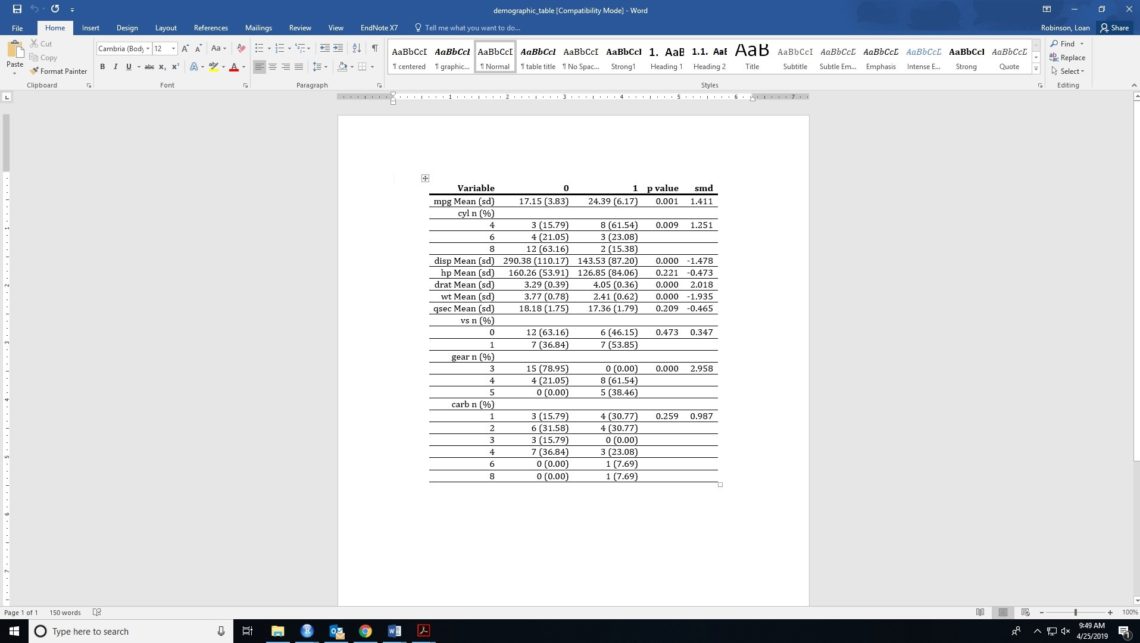
Demographic table from “demoGraphic” R package.
This is a R package I built, I just want to show you guys how to use demoGraphic package to get demographic table quickly. The Demographic Table in R combines contingency table for categorical variables, mean and standard deviation for continuous variables. t-test, chi-square test and Fisher’s exact test calculated the p-value of two groups. The standardized mean difference were performed with 95 % confident interval, and writing table into document file. . There are 3 main functions. cat_table, cont_table and demo_table. Each function return demographic table and smd value with 95% confident interval .
str(mtcars)
'data.frame':	32 obs. of  11 variables:
 $ mpg : num  21 21 22.8 21.4 18.7 18.1 14.3 24.4 22.8 19.2 ...
 $ cyl : num  6 6 4 6 8 6 8 4 4 6 ...
 $ disp: num  160 160 108 258 360 ...
 $ hp  : num  110 110 93 110 175 105 245 62 95 123 ...
 $ drat: num  3.9 3.9 3.85 3.08 3.15 2.76 3.21 3.69 3.92 3.92 ...
 $ wt  : num  2.62 2.88 2.32 3.21 3.44 ...
 $ qsec: num  16.5 17 18.6 19.4 17 ...
 $ vs  : num  0 0 1 1 0 1 0 1 1 1 ...
 $ am  : num  1 1 1 0 0 0 0 0 0 0 ...
 $ gear: num  4 4 4 3 3 3 3 4 4 4 ...
 $ carb: num  4 4 1 1 2 1 4 2 2 4 ...

# we can see all of variables are numeric
# I am gonna convert cyl, vs, am, gear and carb to cateogorical variables

mtcars[,c("cyl","vs", "am","gear", "carb")] = lt;- lapply(mtcars[,c("cyl","vs", "am","gear", "carb")], factor)

str(mtcars)
'data.frame':	32 obs. of  11 variables:
 $ mpg : num  21 21 22.8 21.4 18.7 18.1 14.3 24.4 22.8 19.2 ...
 $ cyl : Factor w/ 3 levels "6","4","8": 1 1 2 1 3 1 3 2 2 1 ...
 $ disp: num  160 160 108 258 360 ...
 $ hp  : num  110 110 93 110 175 105 245 62 95 123 ...
 $ drat: num  3.9 3.9 3.85 3.08 3.15 2.76 3.21 3.69 3.92 3.92 ...
 $ wt  : num  2.62 2.88 2.32 3.21 3.44 ...
 $ qsec: num  16.5 17 18.6 19.4 17 ...
 $ vs  : Factor w/ 2 levels "0","1": 1 1 2 2 1 2 1 2 2 2 ...
 $ am  : Factor w/ 2 levels "1","0": 1 1 1 2 2 2 2 2 2 2 ...
 $ gear: Factor w/ 3 levels "4","3","5": 1 1 1 2 2 2 2 1 1 1 ...
 $ carb: Factor w/ 6 levels "4","1","2","3",..: 1 1 2 2 3 2 1 3 3 1 ...

# let's take a look of table
lapply(mtcars[,c("cyl","vs", "am","gear", "carb")], function(i) table(i, useNA="ifany"))


# Let's use "am" variable is outcome, because it has 2 levels.
# Let's apply demoGraphic package

??demoGraphic

# let's check categorical variables
var = c("cyl","vs","gear", "carb")
group_var = "am"
categorical_table = cat_table(var,group_var, mtcars)
categorical_table$demo_table
categorical_table$demo_table
     Variable          0         1 p value   smd
1   cyl n (%)
2           4  3 (15.79) 8 (61.54)   0.009 1.251
3           6  4 (21.05) 3 (23.08)
4           8 12 (63.16) 2 (15.38)
5    vs n (%)
6           0 12 (63.16) 6 (46.15)   0.473 0.347
7           1  7 (36.84) 7 (53.85)
8  gear n (%)
9           3 15 (78.95)  0 (0.00)   0.000 2.958
10          4  4 (21.05) 8 (61.54)
11          5   0 (0.00) 5 (38.46)
12 carb n (%)
13          1  3 (15.79) 4 (30.77)   0.259 0.987
14          2  6 (31.58) 4 (30.77)
15          3  3 (15.79)  0 (0.00)
16          4  7 (36.84) 3 (23.08)
17          6   0 (0.00)  1 (7.69)
18          8   0 (0.00)  1 (7.69)

# This is continuous variables
var = c("mpg","disp", "hp", "drat", "wt", "qsec")
group_var = "am"
numeric_table = cont_table(var,group_var, mtcars)
numeric_table$demo_table

        Variable               0              1 p value    smd
1  mpg Mean (sd)    17.15 (3.83)   24.39 (6.17)   0.001  1.411
2 disp Mean (sd) 290.38 (110.17) 143.53 (87.20)   0.000 -1.478
3   hp Mean (sd)  160.26 (53.91) 126.85 (84.06)   0.221 -0.473
4 drat Mean (sd)     3.29 (0.39)    4.05 (0.36)   0.000  2.018
5   wt Mean (sd)     3.77 (0.78)    2.41 (0.62)   0.000 -1.935
6 qsec Mean (sd)    18.18 (1.75)   17.36 (1.79)   0.209 -0.465


# now put everthing togetther
all_var = c("mpg", "cyl", "disp", "hp", "drat", "wt", "qsec", "vs","gear", "carb")
group_var = "am"
all_table = demo_table(all_var, group_var, mtcars)
all_table$demo_table
all_table$smd_table

   Variable  smd.value     smd.lo     smd.up
1       mpg  1.4110460  0.6254189  2.1966731
2       cyl  1.2505757  0.4814381  2.0197133
3      disp -1.4780339 -2.2710199 -0.6850478
4        hp -0.4732373 -1.1881779  0.2417032
5      drat  2.0179726  1.1565019  2.8794433
6        wt -1.9349029 -2.7848568 -1.0849489
7      qsec -0.4645486 -1.1791470  0.2500498
8        vs  0.3466579 -0.3639127  1.0572284
9      gear  2.9580399  1.9466468  3.9694329
10     carb  0.9869582  0.2411924  1.7327241

# Let's write demographic table to docx file

setwd("U:/Documents/Loan Robinson")
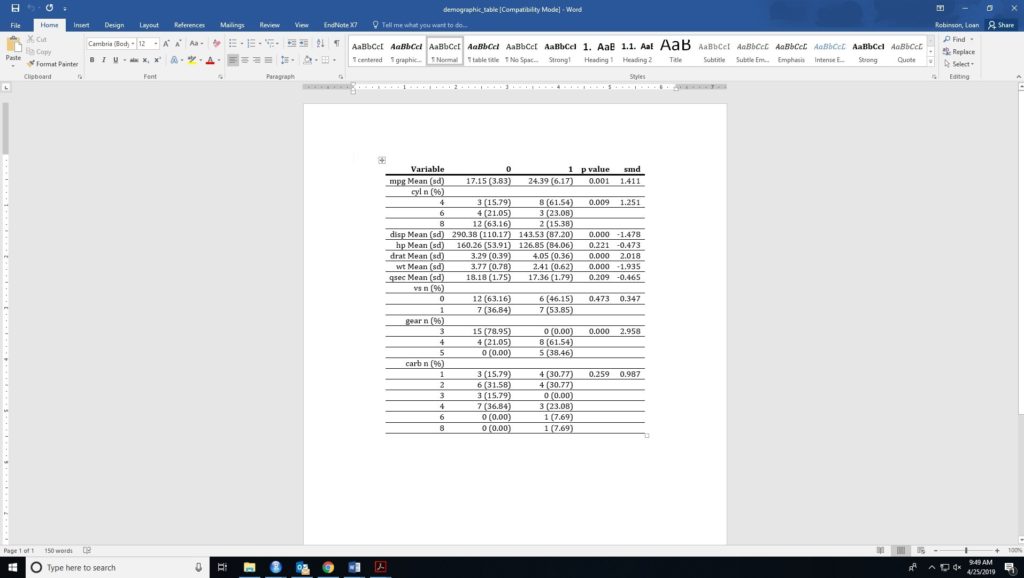
mydocx(all_table$demo_table,"demographic_table")

[1] "U:/Documents/Loan Robinson/demographic_table.docx"
This is demographic_table looks like
2+


One Comment
Alice White
Hi there, thanks for this amazing package!!
I am getting the following error message, both with my data and the mtcars data
Error in names(x) <- value :
'names' attribute [10] must be the same length as the vector [9]
Any suggestions on how I could fix this?
Thanks again
Alice